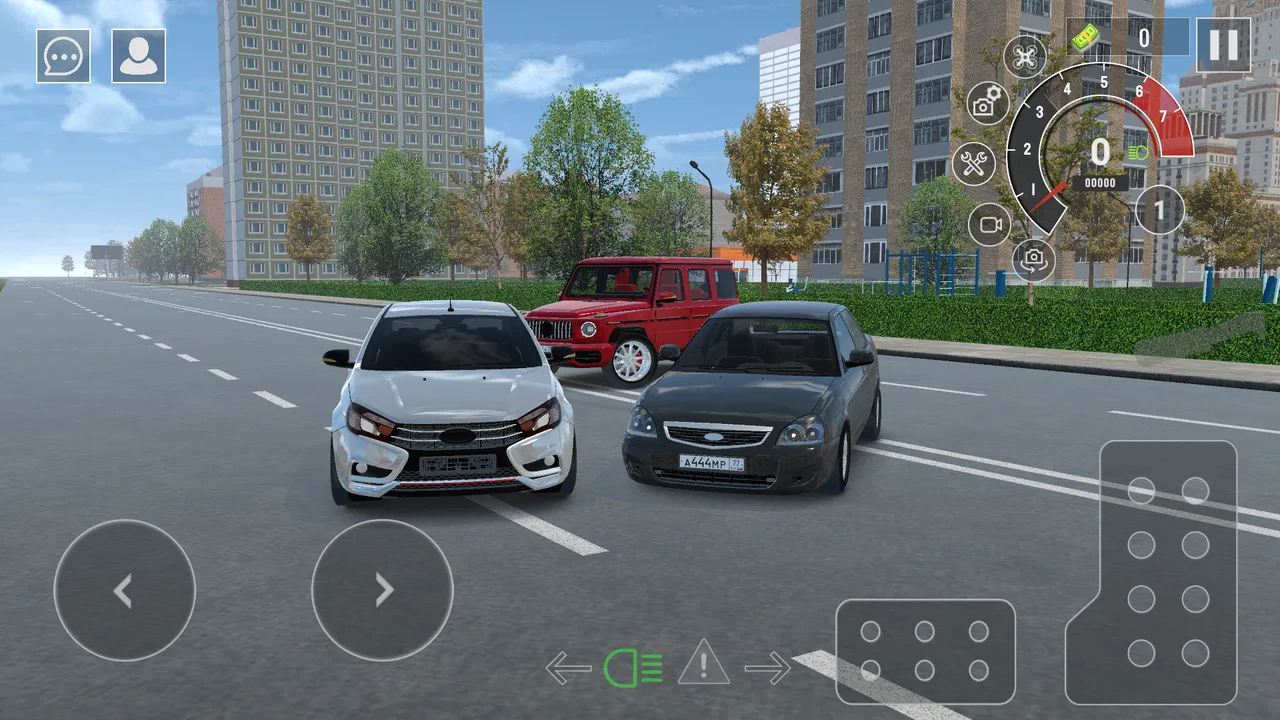
Drive World : Drift Car Racing
- 4.6
- Rating
- 1.00M
- Installs
- Free
- Price

 Analysis by App-foxy
I picked up Drive World : Drift Car Racing expecting a quick mobile driving game, and that is exactly where it makes the most sense: short sessions, simple access, and enough drifting-focused racing to fill a spare moment. It is a free racing game from Sandbox Playpeople & Drone Simulator, available for Android devices running Android 8.0 or later. After spending time with it, I see it as a casual choice for people who want to drive without committing to a long campaign or a complicated simulator setup.
The first thing that stands out is how easy it is to place in a shared household. Someone can pick up the phone, run a few races, and hand it back without needing a long explanation. That makes it more practical than a deep racing title when the device is used by several people. At the same time, I would not treat it as a full replacement for a console-style racer. Its appeal is convenience and drifting, not the feeling of owning a huge, detailed racing career.
How it fits into a shared household
In my experience, the best everyday use is a short break: one person has a few minutes before leaving the house, another is waiting for a turn with the phone, or a child wants to try a racing game while an adult is nearby. The game’s free entry point removes the need to decide whether a purchase is worthwhile before trying it. That matters on a shared device, where different people may have very different tastes.
You May Also Like

 Blood Strike: 2.5 Anniversary
Blood Strike’s Loadouts Turn Every Drop Into a Tactical Gamble
A close look at Blood Strike’s custom loadouts: how fast access to signature weapons reshapes its battle royale rhythm, rewards preparation, and narrows the gap between fights.

 Pandora - Music & Podcasts
Pandora’s Music Is Easy to Start, but Harder to Recover
Pandora’s strength is its low-effort path from a seed to a station. Its weak spot is how much confidence it asks you to place in connection, setup, and quiet recovery.

 8 Ball Pool
 Is Built on Rivalries, Rematches, and Routine
A close look at the rivalries, rematches, shared routines, and unanswered safety questions that turn a quick pool match into a persistent mobile community.

 Samsung Music
’s Quiet Strength Is Playing What You Already Own
Its reach comes less from spectacle than from dependable access to a personal library. That simplicity is both the app’s strongest retention engine and its ceiling.

 AccuWeather: Weather Radar
AccuWeather Review: A Quick, Clear Forecast for Everyday Decisions
For everyday plans, the best forecast is the one you can understand quickly. AccuWeather makes rain timing, radar, and local conditions easy to act on, with a few trade-offs.

 Hill Climb Racing
Why Hill Climb Racing Still Turns Crashes Into One More Run
A tiny car, a bumpy hill and one more upgrade: Hill Climb Racing keeps resurfacing because its simple chaos makes every near-miss feel personal.
More From Our News Desk
View All News


I also like that the game can work as a low-pressure handoff title. A family member who enjoys drifting can play first, then pass the phone to someone who prefers ordinary racing. The important limitation is that I would not assume that progress, settings, or purchases are automatically separated between users. On a shared phone, the safest approach is to agree who is playing and who is responsible for any purchase before anyone starts.
That sounds obvious, but it is one of the more useful practical details with a free game that offers optional purchases. The available purchase range is from forty-nine cents to four dollars and forty-nine cents per item. I would keep the device owner involved, especially when younger players are using it. The game is free to install, but “free” should not be interpreted as “nothing can be bought.”
For a household, I would set a simple routine: play only on the device owner’s turn, ask before spending, and stop the session before handing the phone to someone else. This is not a special feature of the game; it is a sensible way to avoid confusion when several people use one screen. The game is at its most comfortable when everyone treats it as a shared activity rather than a private account with clearly divided ownership.
What the first session feels like
The game presents itself as a mobile racing simulator, but I would approach that description with realistic expectations. The drifting focus gives the driving a different rhythm from a basic point-to-point racer. Instead of only thinking about braking and steering into a corner, I found myself paying attention to how long to hold a slide and when to regain control. That makes even a short run feel more active than simply following a track.
For a newcomer, my advice is to resist the urge to make every corner dramatic. A controlled slide is usually more useful than holding a drift until the car becomes difficult to position. On a small touchscreen, overcorrecting can turn a promising corner into a messy exit. Shorter inputs and a calmer approach make the game easier to read, particularly when another person is waiting for a turn.
This is also where the game differs from many ordinary casual racers. The main attraction is not just speed. It is the balance between entering a corner, starting the slide, and recovering before the next section. That gives the experience a little more personality than a game built entirely around pressing the accelerator and avoiding obstacles.
Boundaries before anyone starts playing
Because this is a shared-device review angle, I think setup boundaries matter as much as driving feel. The owner should be the person who installs the game, checks the current version, and decides whether purchases are acceptable. The current version is 1.0.19, and the game was released on November 21, 2024. Those details are useful when checking that everyone is discussing the same app, especially if several racing games are installed on one phone.
I would also avoid handing the phone over in the middle of a race if the player is trying to learn the controls. A better system is to agree on a small session, finish the run, and then pass the device along. This keeps the experience fair and avoids the common household argument where one person believes another has changed a setting or interrupted progress.
Another practical boundary is storage and attention. I would not install it on a phone that is already struggling with space or performance without first deciding what can be removed. I am not claiming a particular storage requirement or performance level, because those can vary by device. The useful point is simply to test it on the actual shared phone before promising that it will become the household racing game.
If the device belongs to a child, an adult should handle the download and payment decisions. The content rating is Everyone, which makes the game broadly suitable in age terms, but an age rating does not replace supervision around spending or screen time. I see the rating as a helpful starting point, not a complete household policy.
Coordinating turns without making racing stressful
Drifting games can create a surprisingly competitive mood, even when the races are short. One person wants to improve a corner, another wants to try immediately, and suddenly a quick game becomes an argument over the phone. I found that the simplest solution is to give each player a defined turn rather than letting people interrupt one another.
A useful household arrangement is to let the first player use the opening session to learn the controls, then give the next player an equally quiet attempt. After that, compare impressions instead of treating the first run as a final verdict. This is particularly important for younger players, who may need time to understand that losing control during a drift is part of learning rather than proof that the game is too difficult.
I would also keep expectations clear about what counts as progress. A player may care about smooth driving, while another only wants to experiment with slides. Those are different goals. If the household agrees that both styles are valid, the game becomes more enjoyable. If everyone is forced to chase the same result, the more technical drifting element can become frustrating.
One of my favorite small tips is to use the first few attempts as practice rather than score hunting. Focus on one corner or one movement at a time. Notice when the car begins to rotate, then try to straighten it earlier on the next attempt. That kind of deliberate practice is more productive than repeatedly restarting without changing technique.
Age, trust, and the meaning of “Everyone”
The Everyone rating makes this an approachable option for a mixed-age household, particularly when adults want a racing game that does not depend on mature themes. I would still play the first session with a younger user if the phone is shared. That gives the adult a chance to see how the game feels, explain the purchase boundary, and decide whether the amount of drifting and repetition suits the child.
Trust is especially important because the game includes in-app purchases. I would not give a child unrestricted access to the payment flow simply because the game itself is free. A clear rule such as “ask before buying anything” is more useful than assuming everyone understands how optional items work.
For older children and adults, the game can be a good way to practice patience with a touchscreen. It rewards learning how the car responds rather than relying only on reflexes. However, someone looking for a serious driving lesson should choose a more specialized simulator. Mobile controls simplify the experience, and no drifting game should be mistaken for real-world driving instruction.
The game is also a reasonable choice for a household that wants a nonviolent competitive activity. The focus is on racing and vehicle control, so the appeal comes from improving a run and comparing driving styles. That does not guarantee that every family member will enjoy it, but it gives the game a clear place among shared, short-session entertainment.
Where it beats familiar racing alternatives
Compared with a basic arcade racer, this game has a more distinct identity because drifting is central to the experience. If you enjoy the moment when a car rotates through a corner and you correct it just before the exit, the focus is more satisfying than a title where every turn feels interchangeable. It is also easier to recommend to someone who wants a driving game with a little technique but does not want to study a large career system.
Compared with a serious racing simulator, the trade-off goes the other way. A dedicated simulator is usually the better choice for players who want detailed vehicle behavior, extensive tuning, long-term progression, or a more authentic motorsport structure. I would not choose this game for that purpose. Its strength is that it gets to the driving quickly and keeps the central idea understandable on a phone.
Compared with an endless runner, it offers more control over the car and makes cornering the interesting part. An endless runner may be better when someone wants instant reflex action with almost no learning curve. Here, the player benefits from repeating a movement and gradually becoming more consistent. That makes it a better fit for someone who enjoys improvement, even in small steps.
There is also a social difference between this game and a large online racing title. I would choose a bigger multiplayer-focused alternative when a group specifically wants structured online competition. I would choose this one when the goal is to pass a phone around, practice drifting, and enjoy a compact racing session without building the entire evening around it.
Small techniques that make the game easier to enjoy
The first technique is to separate entry speed from corner speed. Going fast into a turn may look exciting, but it leaves less room to correct the car once the drift begins. I found that entering slightly more calmly creates a better chance of finishing the slide cleanly. This is a useful lesson for new players because it turns failure into something understandable: the problem may be the approach, not the steering alone.
The second is to avoid making large touchscreen movements. Big swipes or abrupt changes can make a car feel unpredictable, especially when the player is already sliding. Smaller corrections are easier to repeat, and repeatability is more valuable than one lucky corner. On a shared device, this also helps different players compare their results fairly because they are using a more consistent method.
The third is to treat recovery as part of the drift. A slide that ends with the car pointed toward the next section is more useful than a longer slide that leaves no control afterward. I would teach a younger player to aim for a clean exit rather than the most spectacular-looking moment. That advice applies particularly well when the player is becoming frustrated by repeated spins.
Finally, I would use short practice goals. Try to improve one turn, then stop and hand over the device. This keeps the game from becoming a repetitive chore and makes progress easier to notice. It is a better shared-household workflow than letting one person continue until they are tired while everyone else waits.
What may cause friction
The free price is helpful, but optional purchases introduce a responsibility that paid-once games may avoid. Even small purchases can become a problem when a device is shared and nobody knows who approved them. I would make the payment rule explicit before installation and keep the owner in control of purchases.
The other limitation is the narrowness of the core appeal. Drifting is the reason to play, but it can also be the reason someone loses interest. Players who prefer realistic lap racing, broad vehicle collections, or a deep progression structure may find the experience too focused. I would not recommend it to someone who already knows they want a full racing career on mobile.
There is also a learning curve hidden inside the casual presentation. The game is accessible to start, but driving smoothly takes practice. That is not a flaw by itself, though it can surprise people expecting effortless arcade action. In a family setting, adults should explain that the first attempts may feel awkward and that the game becomes more rewarding when the player learns to control the slide rather than simply hold it.
Device comfort matters too. Racing games require sustained attention, and a small or shared screen may not be ideal for everyone. If the phone is being used for work, school, or communication, I would keep sessions brief and avoid treating the game as something that should always be available. The best household use is intentional, not constant.
Who should install it, and who should skip it
I would recommend it to a casual racing fan who likes drifting, wants a free starting point, and prefers short mobile sessions. It is also a good candidate for a shared household where people want to take turns with a simple driving game and are comfortable setting clear purchase rules. The Everyone rating makes it easier to consider for mixed-age use, provided an adult manages payment decisions and screen-time expectations.
I would be more cautious about recommending it to someone seeking a realistic simulator. The word “simulator” may suggest a level of physical accuracy that a compact mobile racing game does not necessarily deliver. If your priority is detailed handling, extensive customization, or a long competitive ladder, look toward a more specialized racing title instead.
I would also skip it if the main attraction is online competition with friends. This game makes more sense as a personal practice experience or a casual pass-and-play option than as the centerpiece of a serious multiplayer evening. Its value comes from the driving loop and the accessibility of trying it, not from promising a complete motorsport ecosystem.
My household verdict
After using it as a casual racing game, I think Drive World : Drift Car Racing is easiest to recommend when the household understands what it is: a free, drifting-centered mobile game for quick sessions rather than a complete console-style simulator. The average rating is 4.6 from around nine thousand ratings, and the game has passed one million installs, so it has clearly found an audience. Those figures do not replace personal testing, but they fit my impression that the basic idea is easy for many players to understand.
Its strongest household quality is flexibility. An adult can try it without paying upfront, an older child can practice controlled slides, and different players can take turns without needing a long explanation. The main conditions are equally clear: keep purchases supervised, agree on turns, and do not expect the depth of a dedicated racing simulation.
Sandbox Playpeople & Drone Simulator has made a game that works best when approached on its own terms. I would install it for a family member who enjoys cars and wants something immediately playable, especially if drifting sounds more appealing than ordinary lap racing. I would not install it as the only game for a serious racing enthusiast.
My final recommendation is positive but specific: try it if you want accessible drifting on Android 8.0 or later and can keep shared-device boundaries simple. Give each player time to learn, treat purchases as an adult decision, and judge the game by how enjoyable its short driving sessions feel. For that use, it is a worthwhile free download; for a deep, realistic racing career, a different option will be the better fit.
FAQs for Drive World : Drift Car Racing
01What is Drive World: Drift Car Racing?
Drive World: Drift Car Racing is a mobile driving game focused on drifting, fast races, car customization, and open-road exploration. After trying it, I found that it combines arcade-style handling with activities such as performing long slides, improving vehicles, and competing in different driving challenges. It is designed more for casual fun and visual action than for a highly realistic racing simulation.
02Can I play Drive World: Drift Car Racing offline?
The game may allow some driving or practice features without a constant internet connection, but online-dependent elements can require access to the internet. Events, advertisements, cloud-related features, updates, leaderboards, and certain multiplayer options may not work offline. If you plan to play while traveling, it is best to test the game after installation and check its current requirements, since offline support can change with updates.
03Is Drive World: Drift Car Racing free to download?
Drive World: Drift Car Racing can generally be downloaded without an upfront purchase, although the exact availability may depend on whether you use Android or iOS. As with many free racing games, it may include advertising, optional in-app purchases, or premium items that speed up progression and customization. Before downloading, review the store listing and purchase settings, especially if children use the device.
04Does the game include multiplayer or online racing?
The game is primarily built around driving and drifting challenges, but the availability of multiplayer or online competition may depend on the current version and platform. Some features can require an internet connection or account access, and online modes may work differently from solo activities. I recommend checking the in-game menus after installation to see which races, leaderboards, or competitive events are currently active.
05What phones and tablets can run Drive World: Drift Car Racing?
The game should run on many relatively modern Android and iOS phones and tablets, but performance depends on the device’s processor, graphics hardware, available storage, and operating-system version. Older devices may experience slower loading, reduced visual quality, frame-rate drops, or overheating during longer sessions. Keep enough free storage for the installation and updates, and use lower graphics settings if the game offers them.
Pros
- Wide selection of cars with varied handling characteristics.
- Drifting feels responsive and rewarding once controls are mastered.
- Open-world roads offer room to practice and explore freely.
- Car customization lets players create distinctive visual builds.
- Short races and challenges work well for quick gaming sessions.
Cons
- Progression can feel slow without frequent upgrades or rewards.
- Some vehicles and customization options may require grinding.
- Touch controls take time to adjust to
- especially during sharp turns.
- Open-world areas can feel repetitive after extended play.
- Performance may vary on older devices or during busy races.

Drive World : Drift Car Racing
Gallery